This email was translated using machine translation. Please forgive us for any inaccuracies.


Action Required – Details Below


Dear Okta Verify Test Users,


Thank you so much for participating in the Okta Verify for Windows testing. Your involvement and feedback have been invaluable to us.


Here is where we are today, and the next steps required: 

  • On December 13, we deployed the Okta Verify for Windows with the new Okta Passcode capability. 
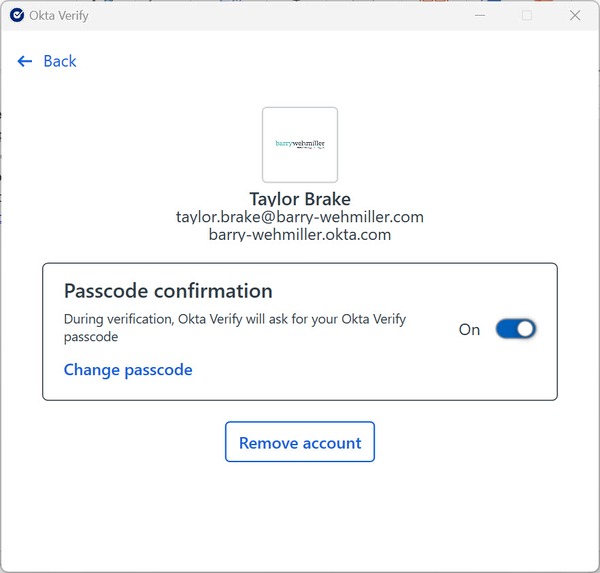
  • Now we need your help to confirm that you have the Okta Passcode option available when you open the Okta Verify application on your computer. Instructions on how to confirm are below.   
  • Once you have checked, please send an email to Arif Uzzaman to verify that you either have the option, or that you do not have the option. Please send this email by Friday, January 9, 2026
  • Note that the use of Windows Hello PIN or Biometrics is no longer an option for MFA. It's important that you enroll your Okta Verify account with the Okta Passcode.
Click here to email Arif Uzzaman

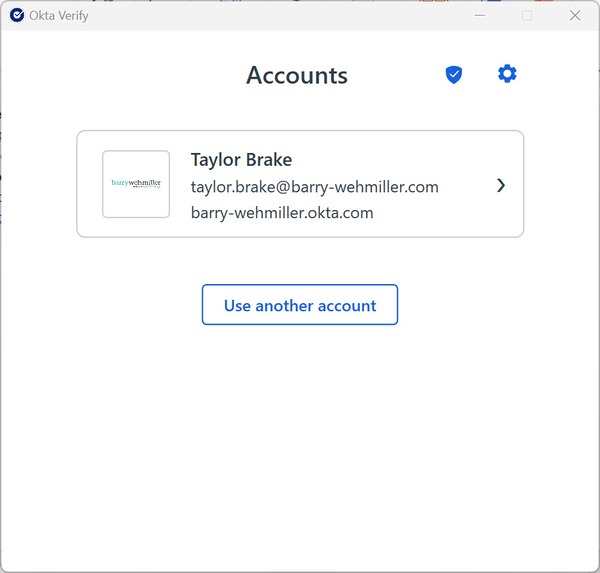
To access the Okta Passcode option, open the Okta Verify application from your Desktop Icons or the Start Menu. If you have already enrolled, your account will appear. If not, please follow the instructions to complete your enrollment. 

After enrolling, click on your name to find the Okta passcode option.


NOTES: 

  • As stated in the instructions, the passcode must be a minimum of eight digits (and no letters or special characters).
  • Enrollment will take four to six minutes to complete. 
  • IT team members, be aware: Security questions are not available as an Okta MFA option for IT team members, so you will need to use Okta Verify, SMS, or a phone call as your MFA factor during the Passcode enrollment process.

To repeat, please reply to Arif Uzzaman to confirm/deny that you have the Okta Passcode option by Friday, January 9, 2026


In addition, please contact Arif directly if you have any questions or experience any issues. 


Thank you for your continued cooperation with this important initiative! 



View Archive